Captain Ratatype

It seems like these things should just come naturally: every time we need to take a screenshot, we ask Google, and presumably at some point we'll remember how it's done. But our memory doesn't work that way — it doesn't retain information that can simply be "looked up again when needed." In other words: if you haven't searched for it yourself, written it down by hand, or practiced it regularly over a period of time, the skill simply won't stick.
The same goes for learning to touch type. No regular practice — and we keep typing with two fingers. Let's figure out how search queries and our productivity are connected.
Below are the top Google searches on the topic of "how to." Screenshots rank pretty high:

We don't bother memorizing these things because we know that whenever we need to, we can just ask ChatGPT or type it into a search bar. And that's fine. But this approach works for quickly looking up shortcuts — not for actually learning a skill.
If you want to learn to touch type, simply knowing how to do it isn't enough. You need to genuinely practice.
Motivation above all
If you've ever tried to learn a new skill, you know that starting and finishing are two very different challenges.
At the beginning, we're inspired and ready to move mountains. Then life gets in the way — household chores, work tasks — and in our case, learning to type quickly gets pushed to the back burner just as fast.
The skill goes unlearned, and we tell ourselves we type just fine as it is. Because, first of all, it's just impossible to keep returning your fingers to the home row (just kidding), and second — do you really have to practice every single day?
Turns out, you do.
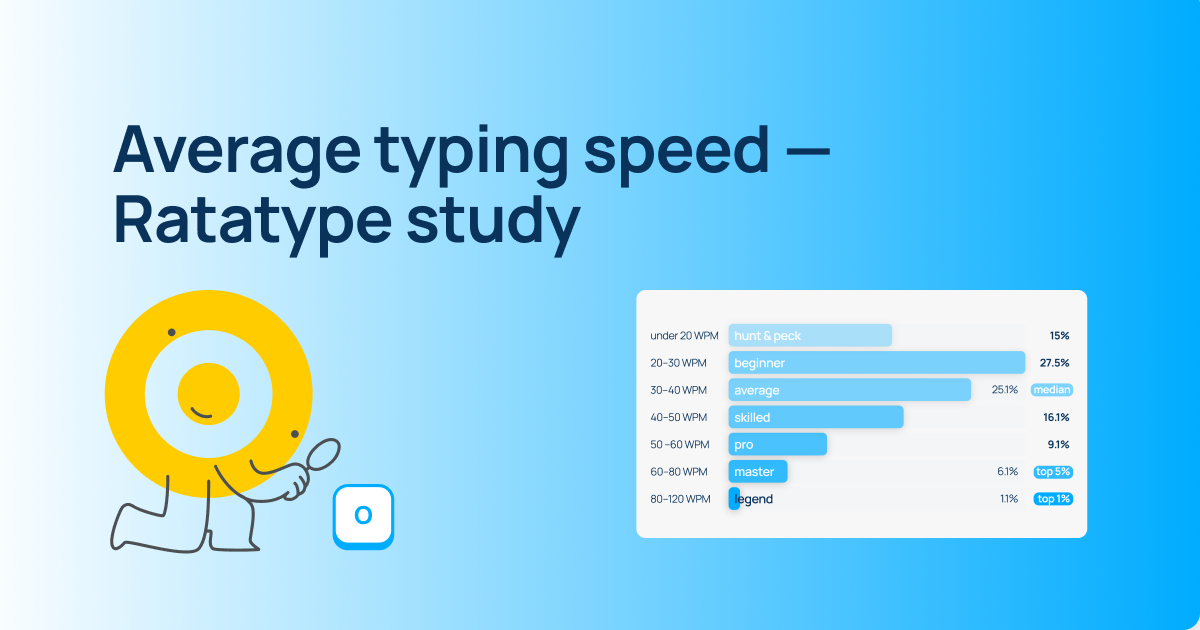
If you think you already type well enough, try finding out your actual speed. Just take a typing speed test and see for yourself.
According to Ratatype data, Ukrainians type at an average speed of 146 characters per minute. The British, for example, average 208 characters per minute. How about you?
How to set yourself up for daily practice
- First. Add it to your daily routine.
For example, if your company has a morning standup, make it a rule to do a couple of typing exercises right after. It takes 10–15 minutes at most, and the task is done. Or maybe you make coffee every morning and scroll through social media. Great. Right after social media, sit down and type. Within a week, it'll feel almost automatic.
- Second. Bookmark your typing trainer or pin it in your browser. It'll always be in front of you as a reminder. At lunch, between tasks — drop in and practice.
- Another option — before you need to write something longer: an email to a colleague, a social media post, homework, etc. — open the trainer and do a couple of warm-up exercises. Your fingers will get into the right rhythm, and you'll have checked off your practice for the day :)
- Mix it up. Today you can practice on the trainer, tomorrow — play a typing game. Switching things up helps you stay consistent and not quit.
Yes, learning takes time. But trust us, it's worth it. After all, we've already calculated that touch typing can give you back 19 days a year that you'd otherwise spend hunting for keys and fixing mistakes.
We recommend starting right now. And luckily, you now know where to practice!
And by the way, we've got screenshots covered too. Here are some articles on the topic:
- How to take a screenshot on Mac and Windows
- Windows keyboard shortcuts — the secret key combinations you need to know
- macOS keyboard shortcuts — secret combinations that will make your work much easier
Stay in touch!