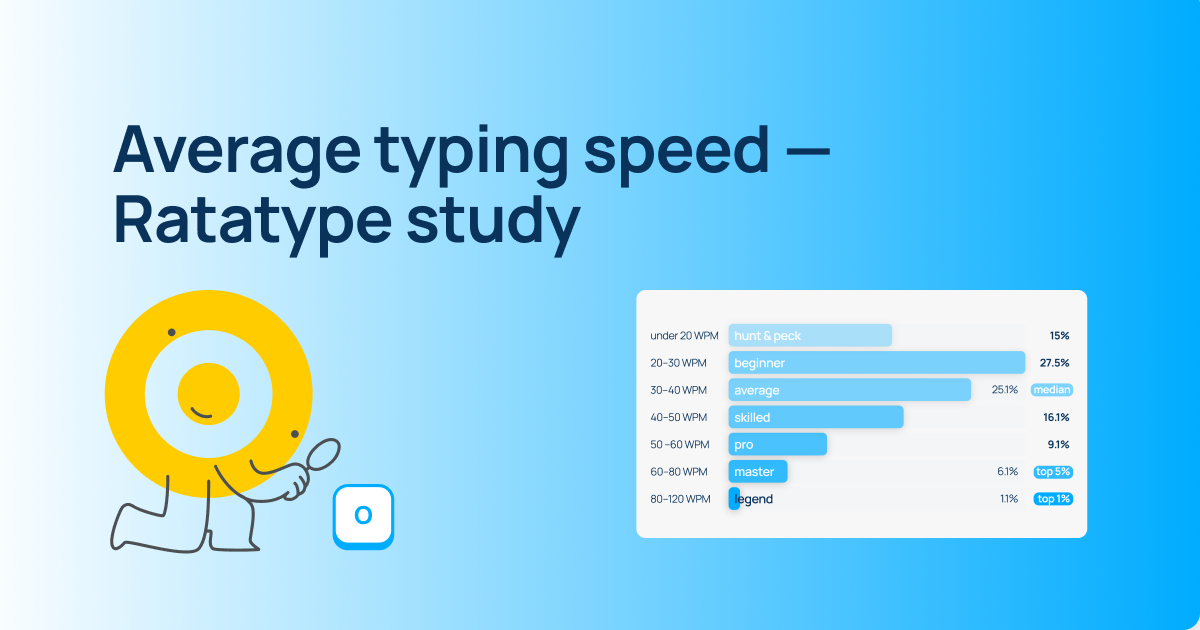
Captain Ratatype

Touch typing is an essential skill for anyone who wants to master digital literacy and use their time efficiently. At Ratatype, we analyzed data from hundreds of thousands of users and found that keyboard games can help save up to 8% of typing time, and regular practice with a typing tutor can save up to 15%. And all of this simply thanks to faster text input.
So it’s only natural to ask: «Where can you learn to type fast?»
There are many different platforms for learning touch typing: for children, adults, business purposes, and more. Some typing tutors are available online, while others need to be installed on a laptop or computer.
How to choose a typing tutor
When choosing a platform for learning to type faster, pay attention to the following:
- whether the site offers a full typing course or just a few repetitive lessons;
- whether the platform supports the language version you need;
- whether there is a typing speed test to track progress;
- whether additional learning tools are available, such as games;
- the cost and whether a free version is available;
- for teachers — whether the platform allows classroom management.
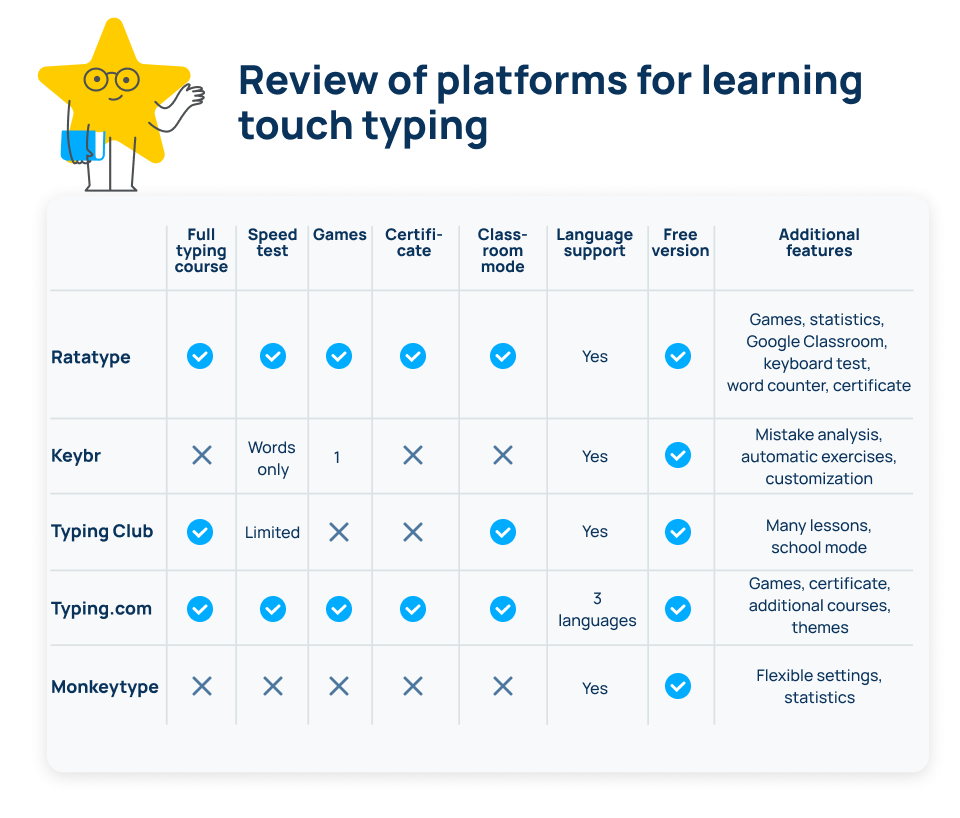
Here is a list of online platforms for learning touch typing.
1. Ratatype — an online platform for learning touch typing for children and adults
The main feature of this platform is its fun and colorful interface. It suits any audience equally well. Ratatype also stands out thanks to additional services and tools, such as a keyboard test.
Services
- Ratatype typing tutor
- Typing speed test for 1, 2, and 5 minutes
- Typing games: Ratashooter — a typing shooter game and Ratarace — typing races
- Services for teachers: class creation, Google Classroom synchronization
- Word counter
- Keyboard test
- Learning statistics
- Typing speed certificate
Paid version
- Free.
- You can purchase an ad-free version with unlimited exercises and access to dark mode.
Language support
Lessons on Ratatype are available in 10 languages:
- English;
- Ukrainian;
- French;
- Italian;
- Spanish;
- German;
- Portuguese;
- Polish;
- Turkish;
- Dutch.
2. Keybr — a tutor for improving accuracy
The Keybr typing tutor helps improve typing accuracy and automatically selects exercises based on your mistakes. Nothing extra — just focused learning.
Features
- typing tutor;
- typing speed test (words only);
- error analysis;
- statistics;
- automatic exercises;
- typing races;
- various color themes and fonts.
Paid version
- Free.
Languages
20+ languages, including:
- English;
- German;
- French;
- Spanish;
- Italian;
- Portuguese;
- and others.
3. TypingClub — a comprehensive course for learning touch typing
TypingClub offers numerous lessons. It is especially suitable for teaching children.
Features
- one large course with several hundred exercises;
- interactive exercises;
- statistics;
- classroom mode.
Paid version
- A free version is available.
- The paid version removes ads and provides access to additional features.
Languages
20+ interface languages, including:
- English;
- French;
- Spanish;
- German;
- Polish;
- Slovenian;
- and others.
4. Typing.com — a versatile typing tutor
Typing.com combines lessons, games, and a typing speed test. It is a large and established project that fulfills its purpose well.
Features
- typing course;
- several typing games;
- typing speed certificate;
- typing speed test;
- teacher mode;
- different interface themes.
Paid version
- A free version is available.
- There is paid ad-free learning plus additional services (coding, digital literacy).
Languages
- English;
- Spanish;
- Portuguese.
5. Monkeytype — a typing speed test service
Monkeytype is suitable for those who already know how to type and want to achieve truly advanced results. There are no extra entertainment features or services — only focused practice.
Features
- various types of speed tests (by time, by text, by words, with quotes);
- statistics;
- custom text options;
- customizable interface settings.
Paid version
Free.
Languages
- multilingual support;
- programming languages.
Conclusion
If you only need a speed test — Monkeytype or Keybr will work.
If you need a comprehensive course — TypingClub or Typing.com.
If you need an all-in-one platform with a course, games, tests, certificates, and classroom learning options — Ratatype offers the broadest feature set among free services.
FAQ — frequently asked questions about touch typing
How long does it take to learn to type fast?
On average — 2–4 weeks of regular practice for 10–15 minutes per day.
What typing speed is considered good?
- 40–50 words per minute — average level;
- 60–80 — good;
- 80+ — excellent.
Can an adult learn touch typing?
Yes. Age is not relevant. The key is consistent practice.
Which typing tutor is the best?
It depends on your goal:
- for learning — tutors with a structured course;
- for practice — speed tests;
- for children — gamified platforms;
- for schools — services with classroom features.
Ratatype includes all of the above services, and since you’re already here — let’s start practicing!